

Besides legal (ensure your site complies with laws like GDPR), SEO (search engine optimization is essential for visibility), security (protecting your site from attacks is critical) and Sustainability (the internet contributes to 3.7% of global carbon emissions) considerations, there are three points to think of:
1. Domain
Get a Domain and register it: (world wide web).your-domain.(top-level domain). Mine is: ericroth.org whereas .org is my chosen Top Level Domain in the domain name system. To such a hosted domain, you then upload your website content. This content, you first write in a combination of the following:
2. Your Side
For basics, you’ll need to learn a bit about the code languages HTML to define the content, CSS to specify the layout, JavaScript to program the behavior and PHP to make your site dynamic and interactive.
HTML & CSS
- With HTML (5 currently being the latest evolution) you can create your own Web site. → You need this one.
- CSS (3 currently being the latest evolution) is a language that describes the style of an HTML document. CSS describes how HTML elements should be displayed. → You need this one.
JavaScript
- JavaScript (JS) is the programming language of HTML and the Web. → You need this one.
- jQuery is a JavaScript Library. jQuery used to (era 2006–2015) simplify JS programming → This site is jQuery free!
- AngularJS extends HTML with new attributes. AngularJS is perfect for Single Page Applications (SPAs).
- JSON (JavaScript Object Notation) is a syntax for storing and exchanging data, it is text, written with JavaScript object notation.
- With AJAX(the search fields in this site are AJAX driven; no need to hit enter), you can:
- Read data from a web server – after the page has loaded.
- Update a web page without reloading the page.
- Send data to a web server – in the background.
W3Schools Toolkit
Besides its free tutorials, W3Schools (it derives its name from the World Wide Web → WWW but is not affiliated with the W3C) offers a few tools of its own, all built on plain HTML, CSS and JavaScript. They’re a quick way to get a first site running:
- W3.CSS is a lightweight CSS framework with responsive design built in:
- Smaller and faster than most other CSS frameworks.
- Plain CSS only, with no jQuery or other JavaScript library needed.
- Mobile first by default, so layouts adapt to PC, laptop, tablet and phone.
- Looks the same across all modern browsers.
- W3.JS is a small JavaScript library for modern HTML applications:
- Lighter and faster than most other JavaScript libraries.
- Made to speed up development.
- Works on all devices.
- AppML (Application Modeling Language) brings data into HTML pages without any installation. It can pull data:
- From objects
- From files
- From databases
- Templates: ready-made W3.CSS templates you can download and adapt to your own needs and taste.
3. Server Side
On the Server Side, code runs on the web server rather than in the visitor’s browser: It stores data, processes requests and builds pages before they’re sent out. These are some of the most common languages and frameworks for it:
- SQL is a standard language for storing, manipulating and retrieving data in databases. → Normally provided.
- PHP is a server scripting language, a powerful tool for making dynamic and interactive Web pages. → You need this one.
- ASP.NET is Microsoft’s framework for building dynamic web pages and applications..
- Node.js is an open source server framework. Node.js allows you to run JavaScript on the server.
Happy Coding!
To get started, try online sandboxes like CodePen and JSFiddle, where you can experiment with HTML, CSS and JavaScript and see the results in real time. For WordPress, WordPress Playground lets you try out a full site right in your browser, with nothing to install.
Stuck on a bug or wondering how something works? AI assistants such as Claude can explain code line by line, help you track down errors, and even write a first draft of a page for you to build on. Just treat its answers like a helpful colleague’s: test them before you go live.
Prefer a more user-friendly approach? Choose a reliable hosting service such as Hostinger, and / or use a drag-and-drop website builder such as Gutenberg, Wix or Weebly (there are many more).
Keep It Simple & Safe

To ease your life, you may opt for one of the web-hosting services featuring a drag-and-drop website builder. They also include the hosting of your domain and website. If you’d rather do the writing yourself, the templates in the W3Schools Toolkit above are a good starting point. Here again, you can host it yourself or have it hosted with an appropriate service.
Whatever option you choose, never underestimate the Hacking & Spamming that hits approx. 30 K websites around the globe daily.
Once Live: Testing
Make sure your website works the way it should or at least the way you want it to. Regular testing helps catch issues early and ensures a smooth user experience. Here are some very useful online testing tools for your perusal: With these tools, you can identify performance bottlenecks and optimize your site’s speed, functionality and Sustainability.
- W3C Validators and Tools → Lead your code to its full potential with great and open-source tools
- Use Website Test Tools to analyze and improve your site’s performance, identify issues, and receive optimization recommendations. These tools provide free global testing and detailed reports to enhance your site’s speed and functionality
- The WAVE Accessibility Tool is a good place to start for your accessibility needs. Run your site through that and it will give you contrast results and help identify trouble areas
- According to the Website Carbon Calculator, this site achieves a carbon rating B in a range of A+ and F and is therefore cleaner than 77% of web pages globally (global average is between E and F)
- Furthermore, this site got audited by the Eco-Friendly Web Alliance and passed → See their Audit Report.
Globally, the average web page produces approximately 0.36 grams CO₂ equivalent or more per pageview. For a website with 10,000 monthly page views, that’s 43 kg CO₂ per year.

This site has undergone rigorous testing and successfully validates, demonstrating careful attention to creating an interoperable web platform. → W3C
Reference: This Site

Get to know more about how this site is composed, what it is made of and what the ingredients are.
Good Composition Increases Usability
Composition is how a site arranges its photos, text, menus and other elements, and it guides users visually. A key part of it is hierarchy: larger text, such as headers, draws the eye first, helping users find their way intuitively.
This Site’s Files
Curious what’s under the hood? The code behind this site is publicly available on GitHub, where developers store, share and track changes to their projects. Browse the files that shape this site’s look and behavior, and see how they keep it jQuery free, W3C validated, light on carbon and at 100% Site Accessibility. You will also find:
- The Eric Theme: A lean, build-free WordPress block theme (FSE), the one running ericroth.org. No page builder, no framework, no webfonts: Templates, theme.json and plain CSS that loads only what a page actually uses
- The Eric Slider: A lightweight, zero-dependency vanilla JavaScript slider / carousel with clean, accessible HTML output and the smallest possible footprint.

This Site’s Performance
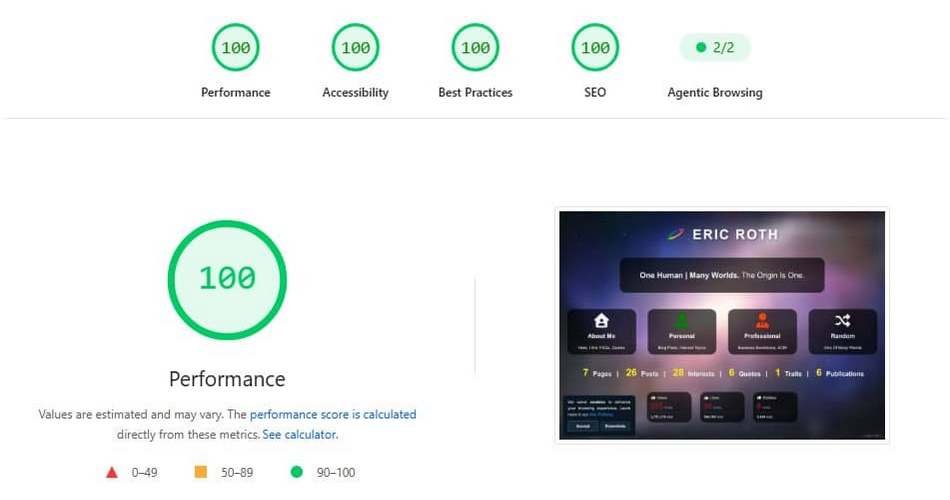
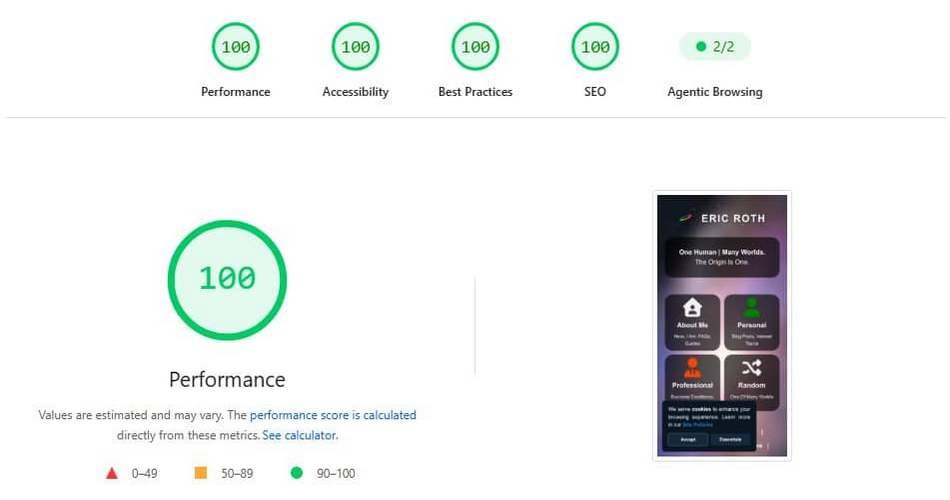
Web Performance is essential for user experience, ensuring fast loading, smooth interactions and visual stability.
A fast, optimized site improves accessibility, reduces frustration and builds trust. Better performance drives engagement, retention, and conversions.
This site uses Google PageSpeed, powered by Lighthouse, to test website speed. You can view the results here.
The Agentic Browsing category evaluates how well a site is constructed for machine interaction (yes, the infamous AI) through a set of deterministic audits.
What’s More



The posts in My Blog feature reflective, story-driven pieces rooted in personal and societal insights. The topics in My Interests explore abstract, philosophical ideas and their cultural and social impact. The lines in My Quotes share brief reflections that highlight clear insights shaped by lived experience. Subscribe to get Site Updates and be notified whenever new content is published.
 Views10,586totalThanks for reading

 Personal
 Professional